

How to Extract Insights From a PDF Without Missing Context
PDFs create a strange reading problem. They preserve structure, which is useful, but that same structure can make the important idea hard to find. A research paper hides its real contribution between methods, caveats and citations. A business report spreads the point across charts, appendices and executive commentary. A slide-exported PDF may look simple, yet leave out the reasoning behind each claim.
If you want to extract insights from a PDF without missing context, you need more than a quick summary. You need a way to keep the document's structure, purpose, evidence and limitations connected as you read.
The goal is not to shrink the PDF into a few sentences. The goal is to understand what the PDF helps you believe, question, decide, teach or reuse.
Insight is not the same as summary
A summary tells you what a document says in shorter form. An insight tells you why something in the document matters.
For example, a summary of a market report might say that remote work adoption has slowed in several sectors. An insight might say that the slowdown is not caused by lack of interest, but by compliance, management and collaboration constraints in specific industries. That second statement is more useful because it connects the finding to causes, boundaries and possible actions.
Good PDF insights usually fall into a few categories:
- A central claim that explains the document's main argument.
- A pattern that appears across sections, tables or examples.
- A contradiction between what the document claims and what the evidence shows.
- A limitation that changes how widely the finding applies.
- An implication for studying, teaching, research, strategy or content creation.
This is why short summaries can feel helpful at first, then leave you unsure what to do next. They compress information, but they often flatten the reasoning that made the information meaningful.
Start with the job you need the PDF to do
Before reading deeply, define your goal. The same PDF can produce different insights depending on whether you are studying for an exam, reviewing literature, preparing a client brief or turning the material into a lesson.
A student may need the main concepts, definitions and likely exam points. A researcher may need the research question, method, assumptions, findings and gaps. A founder or analyst may need risks, market signals and decision criteria. A creator may need original angles, examples and a structure for repurposing.
| Your goal | What to look for | Best output |
|---|---|---|
| Study faster | Definitions, core arguments, examples, likely testable points | Study notes or flashcard prompts |
| Review research | Question, method, evidence, limitations, related work | Paper extraction note |
| Make a decision | Findings, risks, tradeoffs, assumptions | Decision brief |
| Teach the topic | Simple explanations, analogies, misconceptions | Lesson outline |
| Create content | Strong claims, examples, surprising contrasts | Article, script or newsletter outline |
This step matters because insight is not objective in the abstract. An insight is useful because it helps with a specific task.
Map the PDF before extracting anything
Many people open a PDF, search for a keyword, copy a few highlighted lines and call it insight extraction. That works for simple documents, but it breaks down with dense material. You may pull a quote from the wrong section, miss a caveat in the appendix or confuse a cited claim with the author's own conclusion.
Start by building a quick map of the PDF:
- Title, author or organization and publication context.
- Table of contents or major headings.
- Abstract, executive summary or introduction.
- Conclusion, recommendations or final discussion.
- Tables, figures, appendices and footnotes.
- Repeated terms, definitions and acronyms.
This map gives every extracted idea a location. If you use AI for the first pass, ask for the structure before asking for conclusions. A tool like unrav.io can help reframe a PDF into clearer views, but the most useful first step is often simple: make the document navigable.
If your biggest problem is getting oriented in a long file, this guide on how to read a PDF with AI and pull out the ideas that matter covers that first-pass reading workflow in more detail.
Extract insights in layers
Trying to extract every insight from a PDF in one pass creates shallow notes. A better approach is to work in layers. Each layer adds context to the one before it.
Layer 1: Identify the main claim
Ask: what is this document trying to make me understand, believe or do?
In academic papers, the main claim may be found in the abstract, introduction and discussion. In business PDFs, it may appear in the executive summary and recommendations. In technical PDFs, it may be embedded in architecture choices, constraints or implementation notes.
A useful main claim should be specific enough to be tested against the document. For example, instead of writing the report is about AI in healthcare, write the report argues that AI adoption in healthcare is limited less by model performance than by integration, governance and trust.
Layer 2: Tie claims to evidence
Insights without evidence become guesses. Once you find a claim, locate the support behind it.
Evidence may come from:
- Data tables or charts.
- Case studies or examples.
- Methodology sections.
- Interview excerpts.
- Literature reviews.
- Comparisons between groups, time periods or scenarios.
When taking notes, keep the evidence near the insight. Do not separate a conclusion from the page, section or chart that supports it. If you later use the note in an essay, memo or video script, this will save you from making claims that sound stronger than the PDF allows.
Layer 3: Capture the conditions
Most useful PDFs include boundaries. The problem is that readers often skip them because boundaries feel less exciting than findings.
Look for phrases such as based on, in this sample, under these conditions, may not apply, limited by, assumes, excludes, further research or preliminary. These phrases tell you where the insight works and where it might fail.
For example, a PDF may find that a learning method improved retention, but only for a small group, a short time period or a specific subject area. The insight is not that the method always improves learning. The stronger insight is that the method appears promising under those conditions and needs care before being generalized.
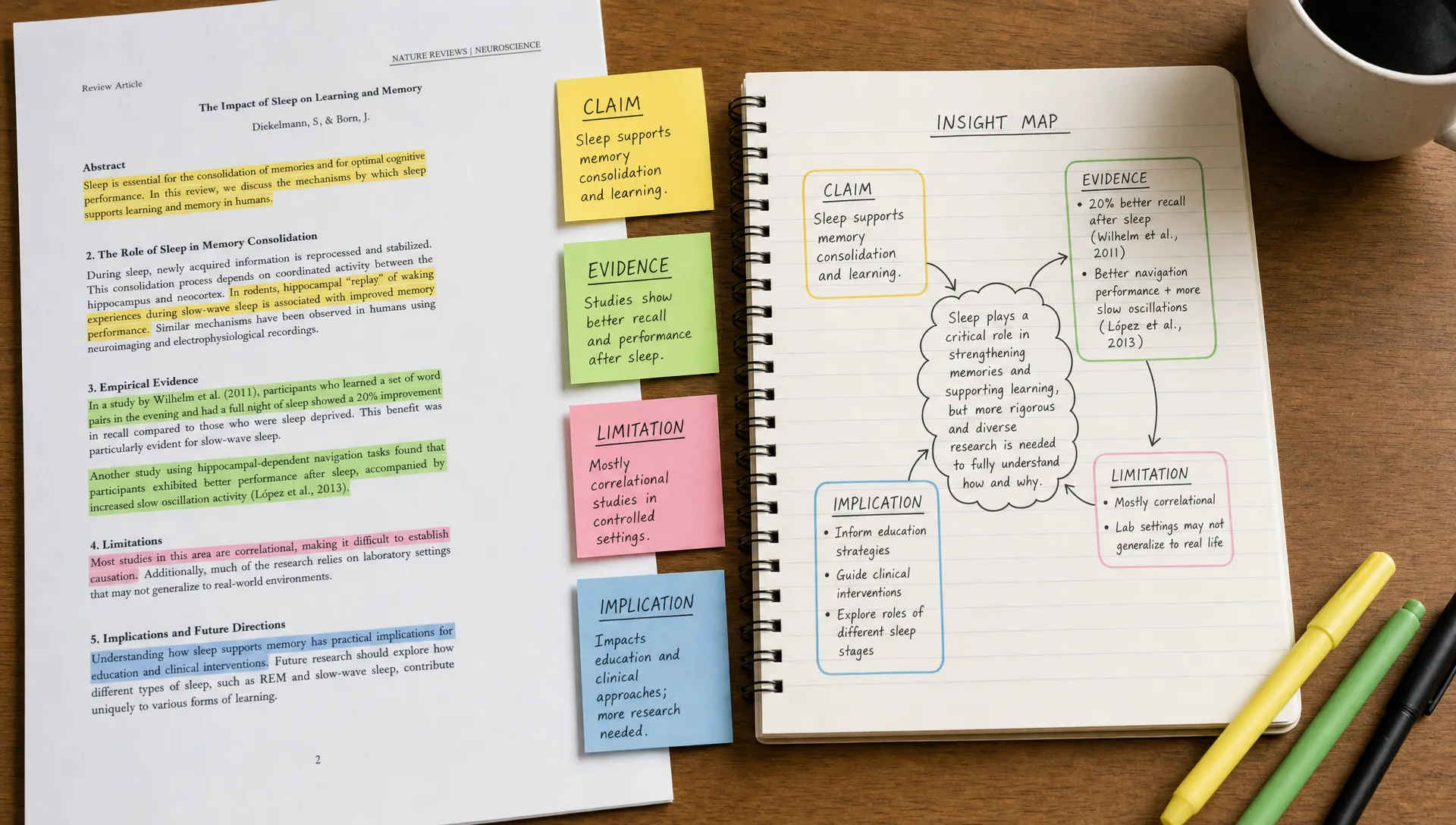
Layer 4: Turn findings into implications
An implication answers the question: so what should I do, ask or remember?
For a student, the implication might be a concept to review before an exam. For a researcher, it might be a gap to investigate. For a product manager, it might be a risk to validate. For a creator, it might be a strong angle for a newsletter or video.
A simple way to write implications is to finish this sentence: if this PDF is right, then...
That phrase forces you to connect the document to a practical outcome without overstating it.
Use AI as a context keeper, not just a summarizer
AI can help you move faster through PDFs, but the way you ask matters. If you ask for a broad summary, you may get a polished answer that skips the details you actually need. If you ask for structured extraction, you are more likely to preserve context.
Use AI to separate tasks:
- First, ask for the PDF's structure.
- Next, ask for the main claim and supporting sections.
- Then, ask for assumptions, limitations and definitions.
- After that, ask for implications for your specific goal.
The key is to avoid treating the AI answer as a final authority. Treat it as a reading companion that helps you notice structure and retrieve relevant passages. You still need to check important claims against the PDF itself, especially for research, legal, medical, financial or technical work.
unrav.io is built around this kind of context-aware reframing. Instead of only producing a short summary, it can help you switch between different ways of understanding content, such as a quick grasp when you need orientation or a teach-it style explanation when you need to explain the material to someone else.
If you prefer asking questions directly inside a document, this article on how to chat with PDF files without losing context explains how to avoid vague prompts and keep answers tied to the source.
Prompt patterns that preserve context
The best prompts are specific about the output and the source relationship. They ask the AI to connect claims to sections, identify uncertainty and adapt the insight to your goal.
| Goal | Context-preserving prompt |
|---|---|
| Find the central argument | Identify the main claim of this PDF, then list the sections that support it. Separate the author's claim from background information. |
| Extract research insights | Pull out the research question, method, main findings, limitations and open questions. Keep each finding connected to its evidence. |
| Prepare study notes | Explain the key concepts I need to understand, then turn them into exam-style questions with short answers. |
| Review a report | Extract the most decision-relevant insights, including risks, assumptions and places where the evidence is weak. |
| Repurpose content | Identify the strongest ideas, useful examples and possible article or video angles, without removing the original context. |
Notice that none of these prompts simply ask for a summary. They ask for relationships: claim to evidence, finding to limitation, idea to use case.
Create an insight note you can reuse
Once you extract insights, store them in a format that keeps context attached. This is especially useful if you read many PDFs over time, such as academic papers, policy documents, company reports or technical manuals.
A practical note template looks like this:
PDF title:
Why I read it:
Main claim:
Key insight:
Evidence or section:
Important context:
Limitations:
Related ideas or sources:
How I might use this:
The important field is not just key insight. It is important context. That line prevents your notes from becoming isolated fragments.
For example, if you are reading a paper on education technology, your note might say that automated feedback improved revision quality in one writing course. The context line might say the study focused on undergraduate writers, short assignments and a single semester. That context changes how confidently you can apply the finding elsewhere.
Check whether you are missing context
Before trusting an extracted insight, run a short context check. This can take less than two minutes, but it catches many common errors.
Ask yourself:
- Is this the author's claim or a claim the author is citing from someone else?
- Does the insight depend on a specific population, time period, location or method?
- Does a table, figure or appendix complicate the conclusion?
- Are there exceptions or limitations stated later in the PDF?
- Am I extracting the strongest idea or just the most memorable sentence?
- Would someone who read the whole document think this note is fair?
That last question is useful because it shifts you from collecting impressive lines to representing the document accurately.
Adapt the workflow to the type of PDF
Different PDFs require different reading behavior. A peer-reviewed paper, investment memo, slide deck and manual do not reveal insight in the same way.
| PDF type | Where insight usually hides | What to be careful about |
|---|---|---|
| Research paper | Research question, method, findings, discussion | Do not ignore limitations or sample details |
| Business report | Executive summary, charts, recommendations, appendix | Check whether charts support the written claim |
| Policy document | Definitions, scope, eligibility, exceptions | Small wording changes may matter a lot |
| Technical manual | Requirements, constraints, steps, warnings | Do not separate instructions from prerequisites |
| Slide deck PDF | Speaker notes, chart labels, sequence of slides | Slides may omit the reasoning behind claims |
| Ebook or guide | Chapter structure, examples, repeated frameworks | Distinguish core principles from supporting stories |
This is where quick summaries are often weakest. They may treat every PDF as if it has the same structure. Insight extraction works better when you respect the genre of the document.
Common mistakes when extracting PDF insights
Most bad insight notes are not caused by laziness. They come from reading too quickly, trusting isolated quotes or asking AI for the wrong output.
| Mistake | Why it causes problems | Better approach |
|---|---|---|
| Starting with a one-paragraph summary | It hides structure and uncertainty | Start with a document map |
| Copying only highlighted sentences | Quotes lose meaning outside their section | Add claim, evidence and context |
| Ignoring charts and tables | Visual evidence may change the argument | Review figures as part of extraction |
| Skipping methods or limitations | You may overgeneralize findings | Capture conditions before implications |
| Asking AI broad questions | Answers may sound clear but miss your purpose | Ask for role-specific, source-tied outputs |
| Treating insight as final truth | PDFs can be biased, incomplete or outdated | Compare with other sources when stakes are high |
If you currently stop at a short digest, it may be worth rethinking the workflow. Summaries are useful for orientation, but they are not the same as understanding.
A simple workflow for extracting insights from any PDF
Use this workflow when you have a dense PDF and need a reliable output.
First, define why you are reading it. Write one sentence that names your task, such as I need to understand this paper for a literature review or I need to extract risks for a client memo.
Second, map the document. Identify the major sections, conclusion, figures, tables and appendices.
Third, capture the main claim. Write it in your own words and make sure it is specific.
Fourth, attach evidence. Link the claim to the section, table, chart or example that supports it.
Fifth, add limits. Note where the claim applies, where it might not and what the author leaves unresolved.
Sixth, translate the insight into your use case. Turn it into a study note, research note, decision brief, teaching explanation or content outline.
Seventh, verify before using. Recheck any important claim against the original PDF and compare with other sources when accuracy matters.
This process takes longer than asking for a quick summary, but it saves time later. Your notes become reusable because they keep the reasoning intact.
Frequently Asked Questions
What is the best way to extract insights from a PDF? Start by mapping the document's structure, then identify the main claim, supporting evidence, limitations and implications. Do not begin with isolated highlights. Context-aware extraction produces more reliable notes.
Can AI extract insights from PDFs accurately? AI can help you find structure, surface important ideas and reframe dense content, but you should verify important claims against the original PDF. Accuracy depends on the document, the tool and the quality of your prompts.
How is insight extraction different from PDF summarization? Summarization shortens the document. Insight extraction explains what matters, why it matters, what evidence supports it and what context limits the conclusion.
What should students extract from academic PDFs? Students should capture key concepts, definitions, arguments, examples, limitations and possible exam questions. A teach-it explanation is useful because it reveals whether you really understand the material.
How do researchers extract insights from papers? Researchers should focus on the research question, method, sample, findings, limitations, contribution and open questions. The goal is not only to understand one paper, but to connect it to other work.
Should I read the whole PDF before using AI? Not always. You can use AI for orientation before reading deeply. For high-stakes material, use AI to guide your reading, then check the original sections yourself.
Next step
If your PDFs are piling up because they feel too dense, start with one document and use the layered workflow above. Map it, extract the main claim, attach evidence, add limitations and turn the result into a note you can actually use.
When you want help reframing dense PDFs into clearer understanding, unrav.io can support that process with AI content understanding, multiple reading modes and PDF-friendly workflows. Use it as a companion for comprehension, not a replacement for judgment.