
How a Content Repurposing Tool Saves Time for Creators
Creators rarely run out of ideas because they lack creativity. More often, they run out of time because every idea has to be reshaped for a different format, audience, and platform.
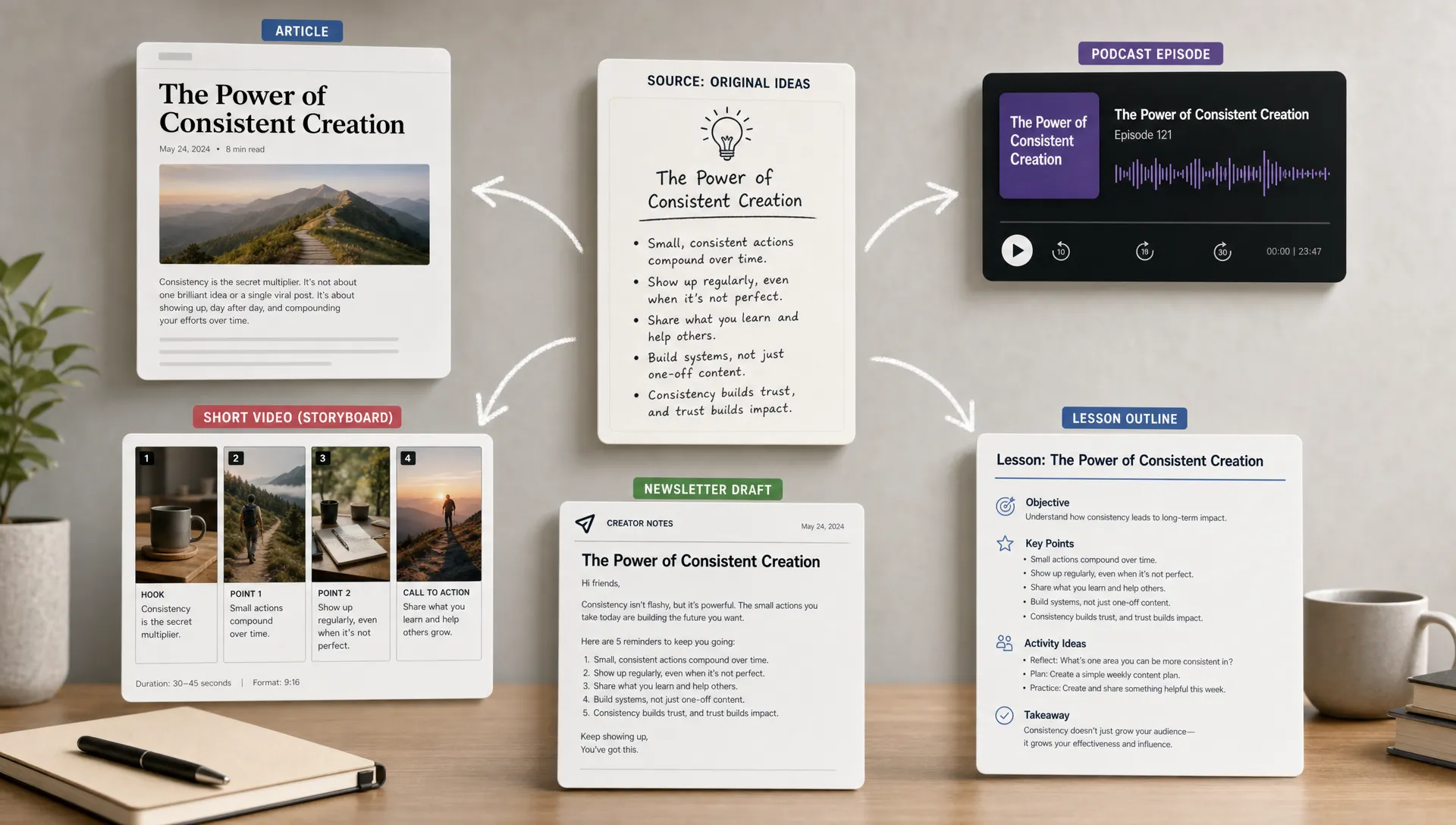
A long article can become a newsletter, a LinkedIn post, a short video script, a slide, a lesson outline, or a podcast segment. But doing that manually means rereading the source, finding the strongest points, cutting what does not fit, changing the tone, and checking that the meaning still holds.
That is where a content repurposing tool helps. The goal is not to replace your judgment or publish AI output untouched. The goal is to reduce the repetitive work between “I have useful source material” and “I know how to turn this into something my audience can use.”
What a content repurposing tool actually does
A content repurposing tool helps you turn one piece of content into several useful derivatives. That source might be a blog post, research paper, PDF, webinar, podcast, YouTube video, customer interview, internal report, or messy draft.
Good repurposing is not the same as copying and pasting. It usually involves three kinds of work:
- Extracting the core ideas, arguments, data points, and examples.
- Reframing those ideas for a new format, such as a thread, script, infographic, email, or study guide.
- Adapting the level of detail, tone, and structure for a specific audience.
For creators, this matters because your audience does not consume everything in the same place. Some people read your newsletter carefully. Others skim LinkedIn. Others prefer short videos, visual summaries, podcasts, or classroom-style explanations.
Repurposing helps you meet those different preferences without starting from zero every time.
Why manual repurposing takes so much time
Manual repurposing feels simple until you count the hidden steps. Before you can create a new post from an old article, you need to decide what the article is really saying. Before you can turn a podcast into a newsletter, you need to find the useful parts. Before you can make a carousel or infographic, you need to identify the structure behind the ideas.
Most of the time is not spent writing. It is spent recovering context.
You ask questions like:
- What is the main claim?
- Which examples are worth keeping?
- What can be cut without losing meaning?
- What would a beginner need explained first?
- What would an expert find too obvious?
- Which parts are suitable for social posts, and which need more nuance?
A content repurposing tool saves time by doing the first pass faster. It can help you move from a large source to a cleaner set of ideas, outlines, angles, and formats. You still decide what to publish, but you do not have to manually rebuild the entire map of the source each time.
This is especially useful when the source material is dense, such as a research paper, technical report, recorded lecture, or long-form interview.
The main ways a content repurposing tool saves creators time
It shortens the “what is this really about?” stage
The first time sink is comprehension. If you are working from a 45-minute interview, 30-page report, or detailed blog post, you need to understand the material before you can reuse it.
A simple summary can help, but summaries often flatten the material. They may give you the main point while missing the assumptions, examples, tensions, and useful side ideas. That is why it helps to use tools that support understanding, not just compression. If you want to explore that distinction more deeply, unrav.io has a useful article on why summarizing falls short without real understanding.
For creators, better understanding leads to better repurposing. You can identify which idea deserves a full post, which belongs in a hook, which needs a visual, and which should be saved for a deeper article.
It turns one source into multiple angles
One strong source rarely contains only one useful idea. A webinar might include a practical framework, a controversial opinion, a beginner explanation, a customer story, and a list of mistakes to avoid.
Manually spotting those angles takes time. A content repurposing tool can help you separate the source into different creative directions, such as:
- A beginner-friendly explanation.
- A tactical checklist.
- A contrarian post.
- A teaching outline.
- A visual framework.
- A short script.
- A deeper newsletter issue.
This matters because creators often waste time trying to make one piece work everywhere. A better approach is to extract several angles from the same source, then match each angle to the format where it fits best.
It helps adapt content for different audience levels
The same idea can be written in several ways. A founder may want the strategic takeaway. A student may need the concept explained step by step. A technical reader may want assumptions, methods, and limitations. A busy manager may only want the decision-relevant points.
Repurposing manually means rewriting for each audience. A good tool can help reframe the same source in different modes, such as quick grasp, deeper explanation, or teach-it format.
This is where a tool like unrav.io can be useful. You can use it to work with links, text, PDFs, YouTube videos, and podcasts, then reframe the material based on how you want to understand or explain it. That does not mean every output is publish-ready. It means you get a stronger starting point for your own editing.
Example: turning one long source into many useful assets
Imagine you recorded a 40-minute podcast episode about how remote teams make decisions. You want to reuse it across your channels without spending a full day rewriting everything.
Here is what a practical repurposing workflow might look like:
| Source material | Repurposed output | Creator decision needed |
|---|---|---|
| Full podcast episode | Newsletter outline | Choose the strongest argument and add your voice |
| Key discussion segment | LinkedIn post | Tighten the hook and remove extra context |
| Three recurring themes | Short video script | Make the language more conversational |
| Process explanation | Infographic or visual summary | Decide what should be shown visually |
| Expert quote or insight | Social caption | Check accuracy and add context |
| Lessons from the episode | Blog post section | Expand examples and improve flow |
The time saved comes from not having to manually listen, transcribe, extract, classify, and restructure everything from scratch.
If the source has a clear process, framework, or comparison, a visual output can be especially useful. For example, you can turn dense material into a clean visual summary with unrav.io’s infographic converter, then refine the visual for your audience or platform.
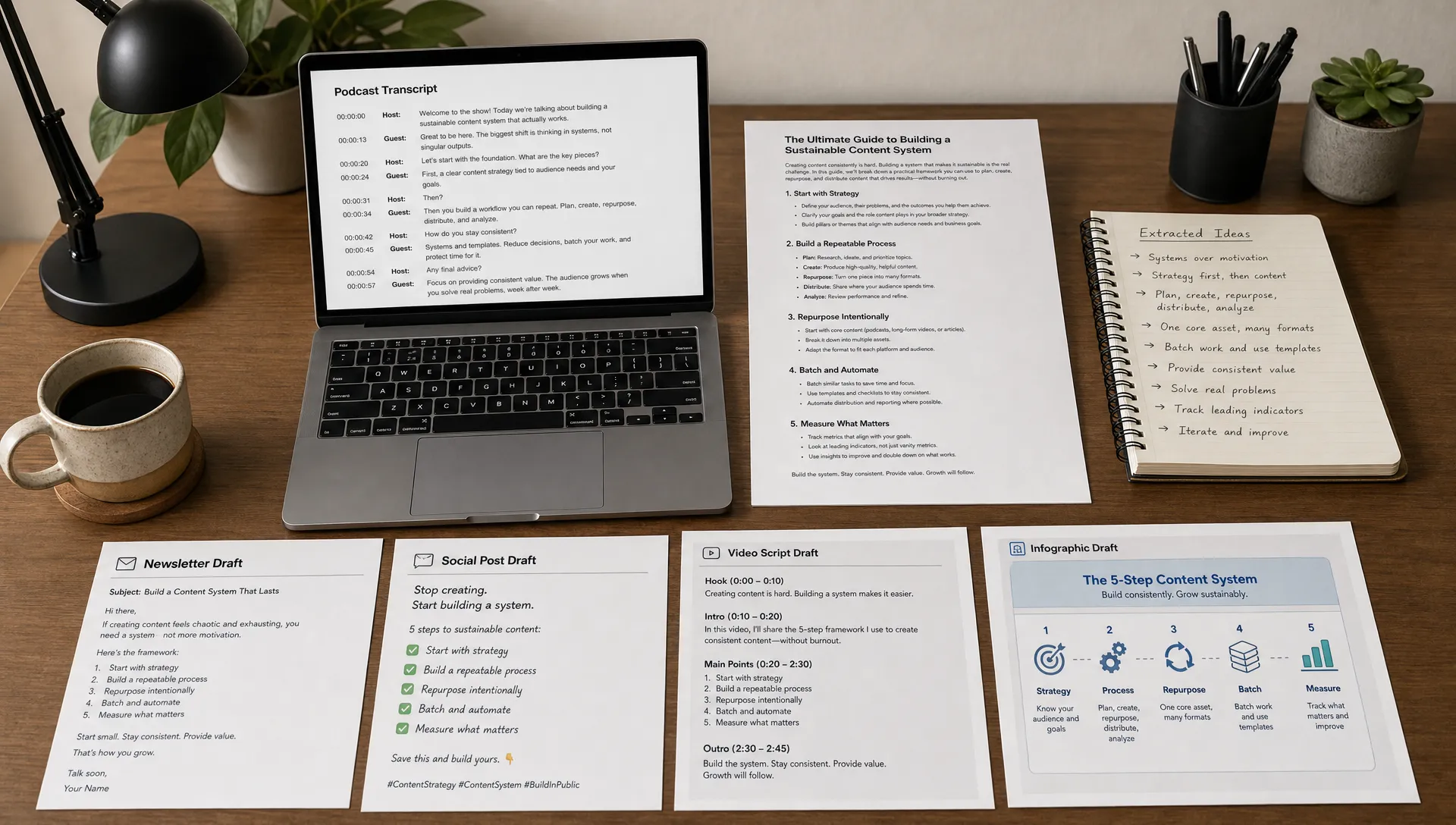
A faster content repurposing workflow for creators
A content repurposing tool is most useful when it sits inside a clear workflow. If you simply ask for ten posts from one article, you may get generic results. If you guide the tool with a specific purpose, the output becomes much easier to edit.
Start with the source and the audience
Before generating anything, define what you are working with and who it is for. A research-heavy source needs different handling from a personal essay or interview.
For example, you might say: “This is a technical article for product managers. I want to turn it into a beginner-friendly LinkedIn post and a newsletter outline for founders.”
That context helps the tool preserve what matters and remove what does not.
Ask for structure before asking for finished content
Many creators jump straight to “write me a post.” A better first step is to ask for structure.
Useful starting outputs include:
- Main ideas and supporting points.
- Strongest examples.
- Possible content angles.
- Audience questions the source answers.
- Claims that need fact-checking.
- Sections that should not be oversimplified.
This gives you control. You can choose the best angle before drafting, instead of editing a generic post that chose the angle for you.
Match each idea to the right format
Not every idea belongs in every format. A nuanced argument may work better as a newsletter than a short social post. A step-by-step process may work well as a carousel, infographic, or tutorial. A surprising insight may make a strong hook for a short video.
Here is a simple way to think about format fit:
| If the source contains | Consider repurposing it into |
|---|---|
| A clear process | Checklist, tutorial, infographic, carousel |
| A strong opinion | LinkedIn post, essay, short video script |
| Multiple related concepts | Mind map, explainer, teaching notes |
| Research findings | Briefing note, study guide, comparison table |
| A story or interview | Newsletter, podcast clip, quote post |
| A long explanation | FAQ, beginner guide, lesson outline |
When ideas are connected but hard to organize, visual thinking can help. For sources with many relationships between concepts, the guide on using a brain map maker to connect ideas faster is a good companion to a repurposing workflow.
Edit for meaning, not just style
AI-assisted repurposing still needs human review. This is especially important for creators who work with educational, technical, legal, financial, scientific, or health-related topics.
Editing should not only fix tone. It should check meaning.
Ask yourself:
- Did the output preserve the original claim accurately?
- Did it remove important nuance?
- Did it imply certainty where the source was cautious?
- Did it introduce unsupported examples or statistics?
- Does it sound like you, or like generic internet content?
Google’s guidance on helpful, reliable, people-first content is also a useful reminder here. Repurposing should add value for the reader, not create thin copies of the same idea across platforms.
Common mistakes that waste time even with a tool
A content repurposing tool can speed up your workflow, but only if you use it with direction. Without direction, you may simply create more drafts to review.
One common mistake is trying to repurpose everything. Not every source deserves ten outputs. Some pieces should become one strong post. Others should become a saved note or reference for later.
Another mistake is treating the first output as final. AI-generated drafts often need stronger examples, clearer transitions, and sharper judgment. The tool can help you get from source to draft faster, but your editorial taste still determines whether the result is worth publishing.
A third mistake is ignoring platform context. A newsletter introduction, a YouTube script, and a LinkedIn post may come from the same idea, but they need different pacing. Repurposing works best when you adapt the form, not just the length.
When creators benefit most from a content repurposing tool
A content repurposing tool is most valuable when you regularly work from rich source material. If your content begins with research, interviews, articles, videos, reports, or teaching material, the tool can reduce the heavy lifting.
It is especially useful for:
- Content creators who want to turn long-form work into social posts, scripts, newsletters, and visuals.
- Educators who need to simplify readings into lesson notes, explanations, or study prompts.
- Researchers and analysts who want to turn papers, reports, or briefings into clearer summaries and comparisons.
- Founders and marketers who need to extract messages from webinars, customer calls, or industry articles.
- Students and lifelong learners who want to turn dense materials into notes, questions, and revision guides.
The shared problem is the same: there is too much useful information trapped inside long-form material. Repurposing tools help you unlock it faster.
How to choose a content repurposing tool
The best tool depends on the type of content you work with and the way you think. Some tools focus on social media captions. Some focus on video clips. Some focus on summaries. Others help you understand and reframe source material before you create anything public.
Look for a tool that supports your real inputs. If you work with PDFs, YouTube videos, podcasts, articles, and pasted text, you need flexibility. If you create educational content, look for modes that help explain and teach, not just shorten. If you often work with complex topics, prioritize context-aware outputs over generic templates.
A good repurposing tool should help you answer these questions faster:
- What is the source really saying?
- What are the strongest ideas?
- Which audience would benefit from each idea?
- What format fits each idea best?
- What needs human review before publishing?
That is the practical value. It gives creators more time for judgment, originality, examples, and distribution.
Frequently Asked Questions
What is a content repurposing tool? A content repurposing tool helps turn one source, such as an article, video, podcast, PDF, or report, into other formats like posts, outlines, scripts, notes, newsletters, or visuals.
Does a content repurposing tool write finished content for me? It can create drafts and structures, but you should still review, edit, fact-check, and add your own perspective before publishing. The strongest results usually combine AI assistance with human judgment.
How does repurposing save time for creators? It reduces the time spent rereading, extracting key ideas, finding angles, restructuring content, and adapting material for different platforms. You still edit, but you start from a clearer draft or outline.
Can I repurpose videos and podcasts, not just articles? Yes, some tools support video and audio sources. unrav.io, for example, can help with YouTube videos, podcasts, PDFs, links, and pasted text, which is useful when your ideas come from multiple formats.
Is repurposed content bad for SEO? Repurposed content is not automatically bad. The issue is whether it adds value. A strong repurposed article should be adapted for the reader, include useful context, and avoid thin duplication.
Turn long content into reusable ideas faster
A content repurposing tool saves time because it reduces the repetitive work between consuming material and creating from it. It helps you understand the source, extract the useful parts, find new angles, and reshape ideas for different audiences and formats.
For creators, that means less time staring at long transcripts or PDFs and more time improving the message.
If your work starts with dense articles, videos, PDFs, podcasts, or reports, try using unrav.io to understand and reframe the source before you create. You can start with a link or text, explore different thinking modes, and turn complex material into clearer outputs without needing to sign up first.